
Visual graph editor
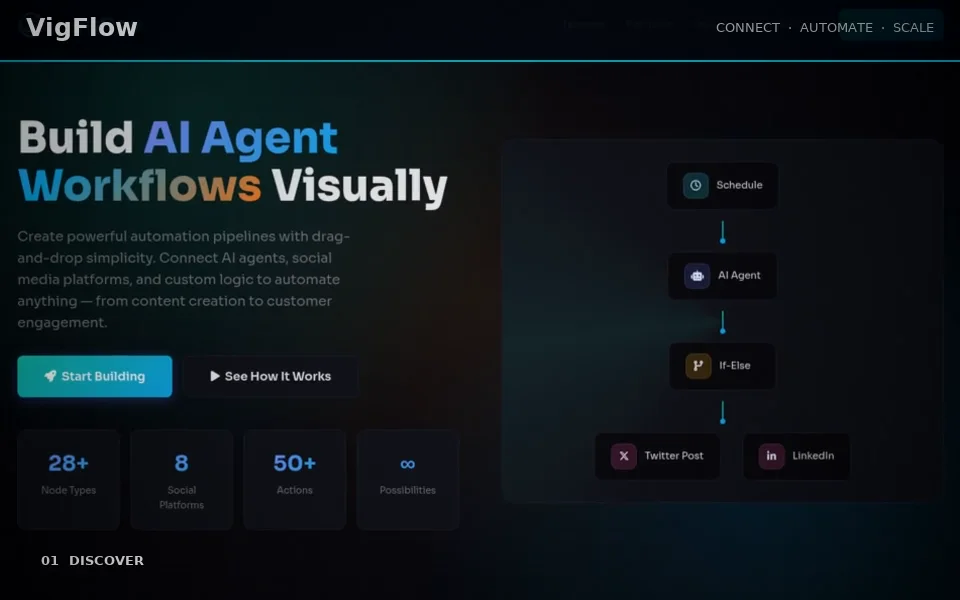
Connect the offered node types and configure their input mappings.
AI & Automation
Make repeatable work visible.
VigFlow is the visual workflow builder for connecting triggers, processing steps, agents and supported integrations. Build a graph, configure each step and inspect a real execution before activating a recurring workflow. Use it for controlled automation where inputs, outputs and human decisions need to be explicit.
Explore this product without signing in. Your account is used when you open the application.
CAPABILITIES / FUNKTIONEN
Connect the offered node types and configure their input mappings.
Use supported manual, scheduled or webhook entry points with the appropriate access controls.
Inspect step results, errors and workflow state in the available execution view.
Include supported review or approval waits where a decision is needed before the flow continues.
IDEA → WORK → REVIEW → RESULT
Create a workflow with an explicit trigger.
Configure nodes, credentials and input mappings.
Run a controlled test and inspect every required output.
Activate the intended schedule or trigger and monitor executions.
Saved workflow graphs and actual execution results.
Use your account and only connected services you are authorized to automate. Provider quotas and workflow capacity apply.
Saved workflow graphs and actual execution results.
Use your account and only connected services you are authorized to automate. Provider quotas and workflow capacity apply.
A connector or schedule does not guarantee a successful external publication. Test the configured destination and inspect each actual run.
Make repeatable work visible.